dochealth
Per-page documentation health metrics for docs-as-code repositories.
The problem
Documentation teams usually judge freshness by a page's last-modified date. That date is easy to move without improving anything: a typo fix, a link update, or a repository-wide formatting commit all make an old page appear well maintained.
I wanted to know which pages in a docs set actually require attention, using information readily available to any docs-as-code repo: the Git history and the prose itself.
What it does
Point the dochealth CLI at a docs repo and it passes every .md
and .mdx page, reads the Git history and the text, and outputs one CSV row per
page. A Streamlit dashboard displays the data from that output CSV.
For each page, dochealth reports:
| Question | Metric |
|---|---|
| When was this page last really edited? | Days since the last commit that changed lines, with housekeeping commits filtered out |
| How old is the content itself? | Age of the page's median line, from git blame |
| Has it changed since it was written? | Ratio of staleness to page age |
| How hard is it to read? | Flesch reading ease, computed on reader-visible prose only |
| What kind of page is it? | Word count, code-block density, and heading structure |
| Who maintains it? | Commit and author counts |
Pages that are too thin to judge, such as navigation stubs, are listed separately instead of being scored.
What I found
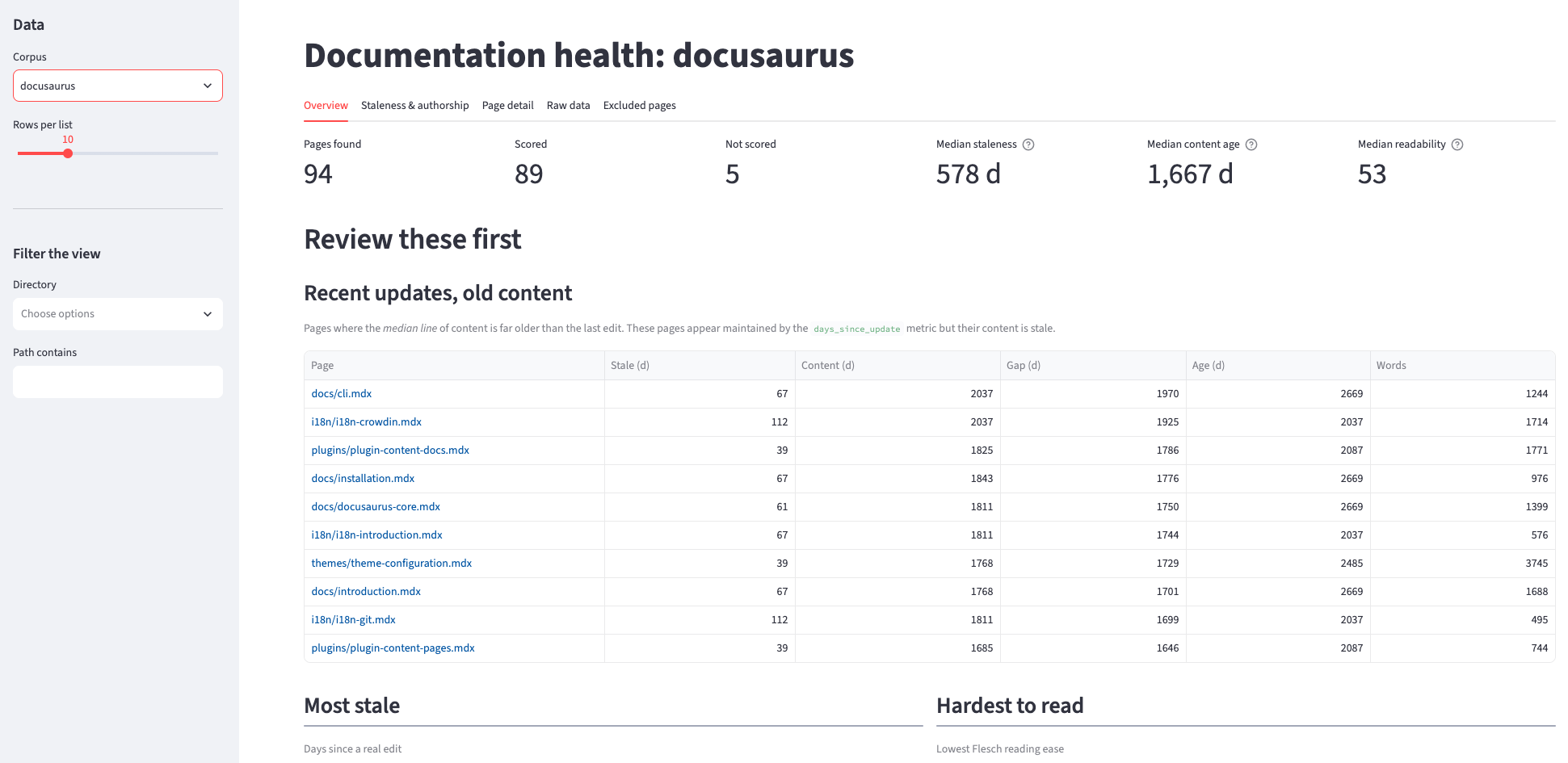
I ran it against two public docs sets: the Kubernetes concept pages (176 pages) and the Docusaurus documentation (94 pages).
- Pages that look maintained and aren't. The Kubernetes page
replicationcontroller.mdwas edited 95 days before extraction. Its median line was 3,422 days old. - One housekeeping commit hid years of staleness. A single
chore:commit made 7 of 8 Docusaurus guide pages look 158 days old. Their last real content edit was up to 1,033 days earlier. - Many poorly maintained pages are easy to overlook. Staleness and readability rankings bury some pages because they don't score badly enough on either score individually. I set up a ratio to surface those pages that are in the lowest 25% of both staleness and reading difficulty.
- Readability scores measure markup unless you stop them. One Kubernetes page scored −29 because leftover HTML formed a single 5,761-character "sentence". With the HTML stripped, the same page scores 34.6.
- A single health score can't compare docs sets. Two unrelated corpora both averaged about 0.42, because percentile ranks fix the mean by construction.
Why there is no health score
The obvious design is one number per page, or even one number scoring the entire docs site. I built this, then decided against it.
The weights behind a composite score couldn't be justified by the data. Too many metrics cross-correlated and the few truly independent metrics didn't say enough about the health of the docs set to warrant the score.
The only score that compares directly between doc sets is the Flesch score, but even then, some docs sets score higher here simply because they demand more technical vocabulary.
Ultimately, dochealth is a measuring instrument instead of a grader. It scores two things, staleness and readability; displays them separately; and presents everything else as context.
The full reasoning, including the approaches I tried and deleted, is in DECISIONS.md.
The dashboard
The live dashboard has five tabs:
- Overview: the pages to review first, and readability against the published Flesch bands.
- Staleness & authorship: every page plotted against its own lifetime.
- Page detail: one page's metrics placed against the rest of the corpus.
- Raw data: the full table.
- Excluded pages: the pages that were not scored, with a reason for each.
Filters narrow what you look at, never what a page is measured against. Percentiles are always computed over the whole corpus.
How it's built
- Python package with a command-line interface (
dochealth extractanddochealth dashboard). - Git (
git logandgit blame) as the data source for every history metric. - pandas for the per-page table and textstat for readability.
- Streamlit and Altair for the dashboard, deployed on Streamlit Community Cloud.
- pytest for the parsers, the scoring rules, and the dashboard itself, plus an end-to-end check against a real clone.
dochealth extract website content/en/docs/concepts \
    --config kubernetes_config.py --out metrics-kubernetes.csv
dochealth dashboard